Most people have never actually checked how findable their face is. They assume it's "probably out there somewhere" and leave it at that. The problem with that assumption is you can't make a decision about it — you don't know if you show up in three places or three hundred.
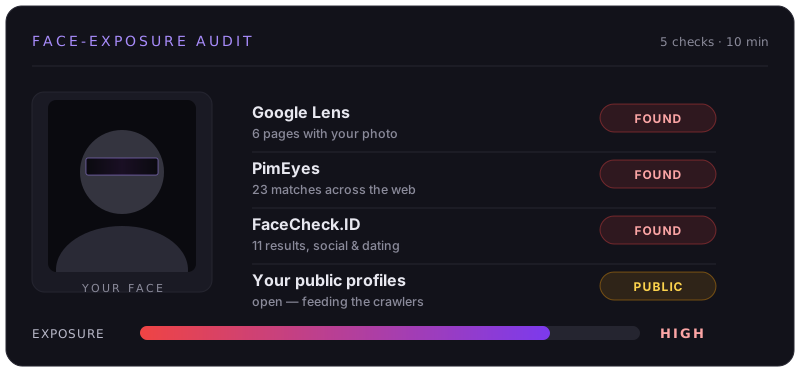
This is a self-audit you can run yourself, right now, with no account and no payment. It takes about ten minutes and ends with a clear picture: which face-search engines return you, and roughly how exposed you are.
Before You Start (2 minutes)
A few things make this audit accurate instead of misleading:
- Use a good reference photo of yourself. Front-facing, well-lit, no sunglasses or heavy shadow, just your face. A recent selfie works. This is the same kind of photo the engines match against, so a clear one gives you an honest result.
- Do it on a desktop browser. The face-search sites are easier to use, and you'll be uploading images and reading results that are cramped on a phone.
- Open a notes file. For each tool, jot the engine name and what it returned: nothing, a few results, or a wall of them. That list is your audit.
- Don't pay for anything. Every step below has a free tier that's enough to tell whether you're indexed. You're auditing, not removing — yet.
1. Reverse Image Search (Google Lens) — 2 min
Start with the broad one. Go to images.google.com, click the camera icon, and upload your reference photo. Google Lens isn't a dedicated face engine — it matches the whole image — but it's the fastest way to see if your exact photos (or visually similar ones) are sitting on public pages.
What you're looking for: does it surface your social profiles, a company "team" page, a news article, an old forum post? Anything that ties the image to a name or a place is a hit. Note them.
Repeat with a second photo if you have one from a different angle. Lens is image-specific, so different photos surface different pages.
2. PimEyes — 2 min
This is the one that matters most. PimEyes is a true facial-recognition engine — it matches your face, not your photo, so it finds pictures of you that you've never seen and never uploaded anywhere yourself.
Upload your reference photo. The free tier shows you thumbnails (often blurred or cropped) and a count of how many pages it found you on. You don't need to pay to read the result you care about: the number.
- Zero results: good — but re-check with a clearer photo before you relax, because a bad input photo can produce a false zero.
- A handful: moderate exposure. Usually old social photos or a professional headshot.
- Dozens or more: high exposure. Common for anyone who's been in group photos, on a team page, in the press, or active on social media for years.
3. FaceCheck.ID — 2 min
FaceCheck.ID is the engine almost nobody checks, which is exactly why it's worth checking. It indexes 100M+ faces and leans toward social, dating, and "scam profile" sources. Its free tier actually returns more useful preview information than PimEyes' does.
Upload the same photo. If it returns matches PimEyes didn't, that's not a contradiction — different engines crawl different corners of the web. This is the core reason a "one search" mental model under-counts your exposure.
4. Yandex Images — 1 min
Yandex's reverse image search has long been unusually good at faces — better than Google for matching a person across different photos. It's a useful tie-breaker: if Google and the face engines came back quiet but Yandex surfaces you, you're more exposed than the others suggested.
Upload your photo, then scan the "similar images" results for ones that are actually you versus just visually similar strangers.
5. Your Own Profiles & Tagged Photos — 1 min
The engines crawl public photos. So the last step is to look at where those photos come from — the things you can actually influence:
- Open your social profiles while logged out (or in a private window). Whatever a stranger can see is whatever's feeding the crawlers — your profile photo, public posts, and your face in friends' public, tagged photos.
- Search your own name + "photo" / your city / your employer. You're looking for the obvious public anchors: a LinkedIn headshot, a conference speaker page, a local news mention.
- Check group and event photos. These are the sneaky ones — you didn't post them, a club or employer or friend did, and your face is in them anyway.
Reading Your Results Honestly
Add it up. If two or more engines return you, you are searchable: anyone with a photo of you and a few dollars can find pages tied to your name. That's the threshold that matters, not the exact count.
A few honest caveats so you don't over- or under-read the audit:
- Free tiers blur and cap results. The engines deliberately under-show on free tiers. Your real exposure is usually higher than the preview, not lower.
- A clean result isn't permanent. These engines re-crawl constantly. A photo posted next month can put you back in the index. "Not found today" is a snapshot, not a guarantee.
- You can't see everything. Clearview AI, for instance, sells only to law enforcement and businesses — there's no public search box to audit yourself against. Absence from the public engines doesn't mean absence everywhere.
What To Do With What You Found
If the audit came back quiet, great — bookmark this page and re-run it in a few months. Exposure changes.
If you showed up on one or more engines, you have two paths. You can remove yourself manually — each engine has its own opt-out form, its own ID and legal-basis requirements, and its own re-indexing cycle, so it's roughly a dozen separate submissions you'd repeat monthly. Or you can have it done for you.
Found yourself in the results?
FacePrivacy files removal requests with PimEyes, FaceCheck.ID, Clearview AI, Lenso.ai and the rest of the major face-search engines on your behalf — then keeps re-checking on a monthly cadence so you stay out, not just out for a week.
Start your removals →