Almost everyone has reverse-searched something. You drag a photo into Google Images, it finds where else that picture appears, and you move on. So when people worry about their face being online, they reach for the tool they know — and when Google turns up nothing alarming, they relax.
That false sense of safety is the whole problem. Google reverse image search and a face-search engine like PimEyes are answering two completely different questions. One looks for the picture. The other looks for you.
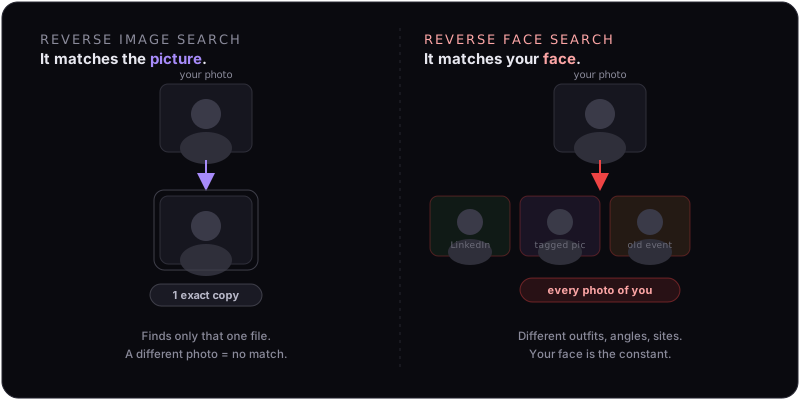
The Core Difference
It comes down to what each system actually indexes.
- Reverse image search compares the file — its pixels, colors, and composition. It's looking for the same picture (or a lightly edited version) republished elsewhere. Change the photo and the trail goes cold.
- Reverse face search ignores the picture and analyzes the face inside it. It extracts a faceprint — a numeric template of the distances and proportions that make your face yours — and searches for that template across millions of other images.
That's why a face engine can take a brand-new selfie it has never seen and still return your LinkedIn headshot, a tagged photo from a party three years ago, and a race-results photo from a 10K you forgot you ran. None of those are the same image. They're all the same face.
Why People Confuse Them
The interfaces look identical — you upload a photo, you get results — so it's reasonable to assume they work the same way. But the assumption leads to two specific, costly mistakes:
- "I reverse-searched myself and found nothing, so I'm not exposed." You searched for a file. A face engine would have found you in a dozen photos that share nothing but your face.
- "I'll just avoid posting that one photo." Withholding a single image stops image search. It does nothing against face search, which matches any picture of you that already exists in the wild — including ones other people posted.
The uncomfortable truth: you don't control most of the photos your face appears in. Friends tag you. Employers put you on a team page. Event photographers upload galleries. Every one of those is a match waiting to happen.
"But My Accounts Are Private"
Going private is a good instinct, and it does help — but it solves the wrong half of the problem. Here's why it isn't enough on its own:
- The faceprint is already made. Face engines scraped the public web months or years ago. Setting your account private now doesn't reach back and delete the template they already extracted.
- Other people's posts stay public. Your privacy settings only govern your accounts. The tagged photos on everyone else's profiles, the company about-page, the news article — all still indexed.
- Matching doesn't need your account at all. Once your faceprint exists, a stranger uploads their own new photo of you and gets a match. Your locked profile is irrelevant to that lookup.
Privacy settings reduce new exposure. They don't remove the existing faceprint that makes you searchable. Those are two different jobs, and only one of them is in your account settings.
Test It Yourself (The Honest Way)
If you want to see the gap firsthand, run the same recent photo through both and compare:
- Google Images / Lens — note how it mostly finds the exact file, or visually similar stock-style images, and often nothing personal.
- A face engine (PimEyes, FaceCheck.ID) — note how it surfaces different photos of you from across the web, frequently ones you didn't know existed.
The difference between those two result pages is the size of your real exposure. For a structured walkthrough, follow our 10-minute face-exposure self-audit — and if your deleted photos keep reappearing, here's why deleting the source rarely removes you.
Which Tools Actually Match Faces
Not everything called "reverse search" does facial recognition. The ones that build and match a faceprint are the ones that matter for your privacy:
- Face-matching engines: PimEyes, FaceCheck.ID, Lenso.ai, and similar — these match you across different photos. This is the category that creates the risk.
- Mostly image-matching: Google Images, TinEye — these match the file. Useful, but they're not the ones turning a stranger's snapshot into your identity.
See our comparison of the major face-search engines and the full list of databases we monitor to know exactly which ones hold a faceprint of you.
What Actually Removes You
If the problem is a faceprint sitting in a recognition engine, the fix has to target the faceprint — not your posts, not one photo. That means filing opt-out and deletion requests with each engine that holds you, and re-filing when new scrapes put you back.
That's the job FacePrivacy does. We submit removals to PimEyes, FaceCheck.ID, Lenso.ai and the other major face-search engines, then keep checking and re-filing so a single new scrape doesn't quietly undo the work. It won't make you invisible to Google — that's a different system — but it shuts down the specific capability that turns any photo of your face into your name, job, and city.
Get your face out of the engines that match it.
FacePrivacy removes your faceprint from PimEyes, FaceCheck.ID, Lenso.ai and the other major face-search engines — and keeps it removed — so no photo of you becomes a shortcut to your identity.
Protect your face →