Dating apps are built on a careful trade: you show your face to strangers, but you control the pace at which they learn anything else about you. Your name, your job, where you live — those are supposed to come out slowly, if at all, and only when you decide.
Face search collapses that trade. Anyone you match with can screenshot your profile photo, drop it into a facial-recognition engine, and skip straight to the parts you hadn't shared yet. No hacking, no special access. It's a paste-and-click.
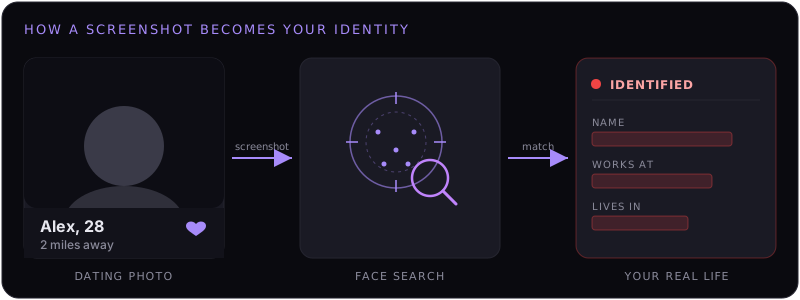
How It Actually Works
The mechanics are mundane, which is what makes it so common:
- They screenshot your profile photo. Every dating app lets you do this; some "notify" on screenshots, most don't.
- They upload it to a face-search engine. PimEyes, FaceCheck.ID, Yandex — all take a single image.
- The engine matches your face, not the photo. It finds other pictures of you across the public web: a LinkedIn headshot, a tagged photo on Instagram, a company team page, an old race-results photo.
- Those other pages carry your identity. The dating photo was anonymous; the LinkedIn match is your full name and employer. Now they have both, linked.
The whole chain takes under a minute and costs a few dollars on a free or trial tier.
Why Dating Photos Are Uniquely Exposed
Of all the photos of you online, your dating pictures are close to the ideal input for a face engine — and that's not an accident:
- They're your best, clearest shots. Front-facing, well-lit, unobstructed, looking at the camera. That's exactly the high-confidence input face matching wants.
- You picked recent ones. Recency improves match accuracy against your other current photos.
- They're handed directly to a stranger. Unlike a buried social photo, a match is given the image, in full resolution, with intent to look closely.
In other words, the photo doing the most to get you a date is also doing the most to get you identified.
Who Actually Does This
It isn't only bad actors. The behavior spans a spectrum:
- The cautious dater verifying you're real before meeting — increasingly normal advice, often well-intentioned.
- The over-curious match who wants your last name, your workplace, your socials before you've offered them.
- An ex or a stalker who finds your new profile and uses face search to confirm it's you and pull your current details.
- Scammers and catfish-hunters cross-checking whether a profile photo belongs to someone else (sometimes that's you they're checking; sometimes it's your stolen photo on a fake profile).
The tool is the same for all of them. You don't get to choose which one is on the other end of the screenshot.
The Two-Way Street
To be fair: face search cuts both ways, and the defensive use is real. Reverse-searching a match's photos is one of the better ways to catch a catfish — if their "photos" turn up attached to a different name on a dozen other profiles, that's your answer.
We're not telling you not to verify the people you meet. We're pointing out that the exact capability you'd use to protect yourself is the one a stranger can use against you. The asymmetry is the problem, and the fix isn't to ban the tool — it's to make sure your face isn't a free lookup.
What You Can & Can't Control
Be clear-eyed about this, because half the advice online is wishful:
- You can't stop a screenshot. Any photo you show can be captured. Treat every dating photo as copyable.
- You can't make your face un-matchable. Short of not showing it, there's no filter or trick that defeats modern face matching reliably.
- You can shrink what the match leads to. Face search is only dangerous because it connects your dating photo to other indexed photos that carry your name. Remove your face from those engines, and the screenshot leads nowhere.
That last point is the whole game. The screenshot is harmless on its own — it's the link to your identity that hurts. Cut the link.
How to Protect Your Face on Dating Apps
- Remove yourself from the face-search engines. This is the one that actually moves the needle. If PimEyes, FaceCheck.ID, and the others don't return you, a profile screenshot can't be turned into your name.
- Use dating-only photos. Where practical, use photos that don't also appear on your LinkedIn, Instagram, or work pages. A face engine still matches your face — but it has fewer named pages to connect to.
- Tighten your public profiles. The matches the engines find come from public photos. Making your socials private and pruning public, named photos reduces what a search can surface.
- Audit yourself first. Spend ten minutes checking which engines actually return you, so you know what you're dealing with before you fix it.
Steps 2 and 3 reduce the damage. Step 1 is the only one that removes it.
A Note on Safety
If you're using dating apps while trying to stay hidden from a specific person — an abusive ex, a stalker — face search is a genuine threat vector, not a hypothetical. Removing your face from the public engines is worth doing, but it isn't a substitute for the rest of a safety plan. If you're in that situation, organizations like the National Domestic Violence Hotline (US, 1-800-799-7233) can help with the broader picture.
Make your dating photos a dead end.
FacePrivacy removes your face from PimEyes, FaceCheck.ID, Lenso.ai and the other major face-search engines — and keeps it removed — so a profile screenshot can't be turned into your name, job, and address.
Protect your face →