FacePrivacy files opt-out and removal requests against the facial-recognition engines that index your face — PimEyes, Clearview AI, FaceCheck.ID, Lenso.ai, and the rest of our list — and re-files them when your face resurfaces. Until now, that lived in a browser tab. Today it lives on your iPhone.
What's in the App
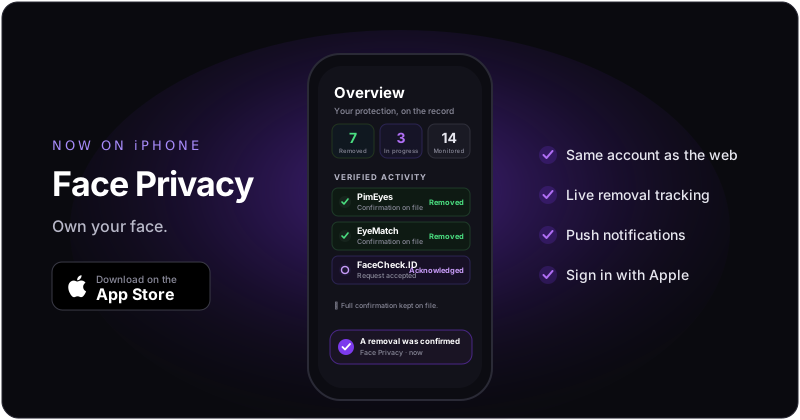
- Live removal tracking. The Overview tab shows exactly where you stand — databases removed, requests in progress, engines monitored — updated as engines respond.
- Verified Activity. When an engine confirms your removal, it goes on the record: service, status, date, confirmation on file. Proof the subscription is working, not a black box.
- Push notifications that matter. A removal gets confirmed — you know. An engine needs a document from you — you know. Our team replies to your message — you know. No noise, no marketing pings.
- Handle document requests in-app. When an engine demands identity proof, capture it with your camera right in the app — or upload the original and use Anonymize for me, and we redact the sensitive fields before anything is forwarded.
- Sign in with Apple or Google. Plus optional two-factor authentication, and full account deletion from inside the app — your data, your call.
Already a Subscriber? You're Done in 10 Seconds
If you subscribed on the website, there is nothing to set up and nothing to pay twice. Your account is the same account:
- Same email + password you use on faceprivacy.ai — just sign in.
- Or the same Google / Apple sign-in if that's how you registered.
- Your subscription, removal history, photos, and Verified Activity all show up exactly as they are on the web. One account, both surfaces.
Web and app stay in sync in both directions — check your dashboard at your desk, get the confirmation push on your phone.
New Here?
Download the app, create an account, upload your reference photos, and subscribe right in the app through your Apple ID — the monthly plan includes a two-week free trial. Everything is managed by Apple: your local currency, your payment method, and cancellation anytime in Settings → Apple ID → Subscriptions. Prefer the web? That works too — the account is interchangeable either way.
Built Like We Preach
A privacy company's app should hold itself to the standard it sells. So, plainly:
- No ad SDKs, no third-party trackers, no analytics that call home. We don't use your device's advertising ID, and we don't track you across other apps or sites.
- Your photos are used for removals — full stop. Uploaded over TLS, stored encrypted, shared only with the engines you ask us to remove you from. Never training data.
- Deletion is a button, not a support ticket. Settings → Account → Delete Account removes your photos, documents, and history from our production systems within 30 days.
The details are in our Privacy Policy — including the iOS-specific section we wrote for exactly this launch.
What's Next
The app is iPhone-first for now. Android is on the roadmap, and app updates ship on the same rhythm as the rest of the service — when we add an engine to the database list or improve how removals are tracked, the app gets it too. If something feels off or missing, tell us from the app itself: Account → Contact the team. A human reads every message.
Take your face off the grid — from your pocket.
Track removals live, get notified the moment an engine confirms, and handle document requests without opening a laptop.
Download on the App Store →