Removing photos of yourself from the internet is a real, doable project — but it's several different jobs wearing one name. The photo on a website, the copy in Google's index, the record at a data broker, and the faceprint in a recognition engine are four separate things, each with its own removal path. Do them in order and most of your visible footprint comes down. Skip the last one and you stay searchable by the one identifier you can't change: your face.
Step 1: Find Every Photo (Search Your Face, Not Your Name)
You can't remove what you can't see, and a name search misses most of it — untagged photos, group shots, old forum avatars. Audit by face instead:
- Google Images & Lens — finds exact copies and pages tied to your name. A start, not the full picture.
- A face-search engine (PimEyes, FaceCheck.ID) — matches your face across different photos, which is how you find the ones you never knew existed. This is the honest measure of your exposure.
- Yandex — unusually good at faces; a useful tie-breaker.
Keep a simple list: the URL, whether you control it, and how bad it is. Our 10-minute self-audit walks through this exact process. If you're unclear on why a face search finds what Google doesn't, read image search vs. face search.
Step 2: Delete What You Control
- Your social accounts. Delete or de-face old profile photos (they're usually public even on private accounts), prune tagged photos, and set profiles private. Don't forget dormant accounts — the cleanest, most-findable photo of you usually lives on a profile you forgot.
- Old platforms. Forums, dating apps, fitness apps, gaming profiles, alumni pages, a blog from a decade ago. Delete the account where you can, not just the picture.
- Your own websites. Team pages, bios, portfolios you no longer need public.
This step works — pages you control genuinely disappear. Two caveats: search engines keep a cached copy for a while (Step 4 fixes that), and anything already scraped stays scraped (the last section deals with it).
Step 3: Photos Other People Posted
The photos you don't control are the hard part, and there's no button for them — just process:
- Ask the person first. Friends, family, coworkers — most people take a photo down within a day if you ask plainly. Untag yourself either way; untagging breaks the link between the photo and your name even when the photo stays.
- Use the platform's reporting tools. Facebook, Instagram, and TikTok all have privacy-violation report flows for photos of you posted without consent. Results vary; it costs nothing to file.
- Contact the site owner. For blogs, event galleries, and small sites, email the webmaster and ask. In the EU/UK, cite GDPR Article 17 (right to erasure) — it noticeably improves response rates. Elsewhere, a polite, specific request still works more often than people expect.
- Going forward, blur. When you or others share group photos, blur the faces that don't need to be there — our free blur tool runs entirely in your browser.
Step 4: Google's Removal Tools (the Search Layer)
Google doesn't host the photos, but it decides whether they're findable. Three tools, all free:
- "Results about you" — Google's dashboard for requesting removal of results containing your personal info, and for monitoring when new ones appear.
- Outdated Content Removal — when you've already deleted a photo but Google still shows the cached copy, this tool forces the refresh.
- Policy removals — explicit images posted without consent are removable under Google's dedicated policy, separate from the general tools.
Step 5: Data Brokers and People-Search Sites
Whitepages, Spokeo, BeenVerified, Radaris and dozens more republish your name, address, and often photos scraped from social profiles. Each has its own opt-out form; each re-adds you when a fresh data dump arrives. Do the big ones by hand, or use a data-broker removal service (Incogni, DeleteMe) to grind through the list monthly.
One thing to be clear-eyed about: data-broker services don't touch facial-recognition engines. They remove records tied to your name. Your face is a different index.
What You Genuinely Can't Delete
Honesty section. No service — including ours — can remove:
- News articles and journalism. Publishers almost never unpublish, and in most countries the law protects that.
- Other people's rights. A photo someone took at a public event is, in most jurisdictions, theirs to post. You can ask; you usually can't force.
- Archives and re-uploads. The Wayback Machine, mirrors, and screenshots mean a once-public photo can resurface. Removal reduces circulation; it can't guarantee extinction.
- Datasets already trained on. If a photo went into an AI training set years ago, deleting the source doesn't reach into the model.
The goal isn't perfection — it's making yourself hard to find instead of one search away.
The Layer Deleting Doesn't Touch: Your Faceprint
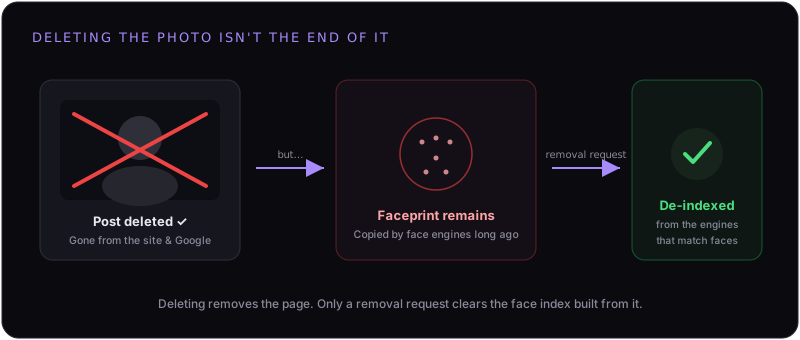
Here's the part every "delete yourself" guide skips. Facial-recognition engines — PimEyes, Clearview AI, FaceCheck.ID, Lenso.ai and the rest — scraped the public web years ago and turned every face they found into a faceprint: a searchable template of your face. Deleting the original photo does not delete that template. Anyone with one new picture of you can still match it to your identity, even if every photo you ever posted is gone. We've covered why deleted photos keep showing up in face search in detail.
Clearing that layer means filing opt-out and deletion requests with each engine — and re-filing when new scrapes put you back. That's the job FacePrivacy does: removals across the major face-search engines, verified confirmations on file, re-filed monthly so the work sticks.
Finish the job: get your face out of the engines.
FacePrivacy removes your faceprint from PimEyes, FaceCheck.ID, Clearview AI, Lenso.ai and the other major face-search engines — and keeps re-filing as they re-scrape — so the photos you can't delete stop leading back to you.
Protect your face →