Why a normal blur can come undone
A standard blur replaces every pixel with a weighted average of its neighbours. The weights are always the same, so the picture is still in there, spread out. Image software can partly reverse a known blur with a technique called deconvolution.
- Software can recognise people through it. In 2016, researchers at Cornell Tech trained neural networks to identify people in pixelated photos and in faces blurred with YouTube’s own blur tool, and the networks often got the identity right (McPherson, Shokri and Shmatikov, Defeating Image Obfuscation with Deep Learning).
- Pixelation is reversible too. The open-source tool Depix recovers text hidden by pixelation in screenshots.
A blur looks safe to your eye. The question is what software can still pull out of it.
How Shield blur works
You paint over the face as before. While you drag you see an ordinary blur as a preview. When you let go, Shield blur replaces that whole stroke in three steps:
- It shrinks the area to coarse blocks, big enough that the area you paint is never more than eight blocks across its shorter side, on a grid that starts at a random offset. The outline of the head, the hairline and the colours survive. The eyes, nose and mouth detail does not.
- It evens the blocks out toward the area’s average colour, then snaps every colour to a coarse step with random noise mixed in, so dark spots like the eyes soften and the exact values a deblurring tool works back from are gone.
- It spreads the blocks back out, softens them and adds fine grain, so the result looks like an ordinary blur that keeps the person’s silhouette.
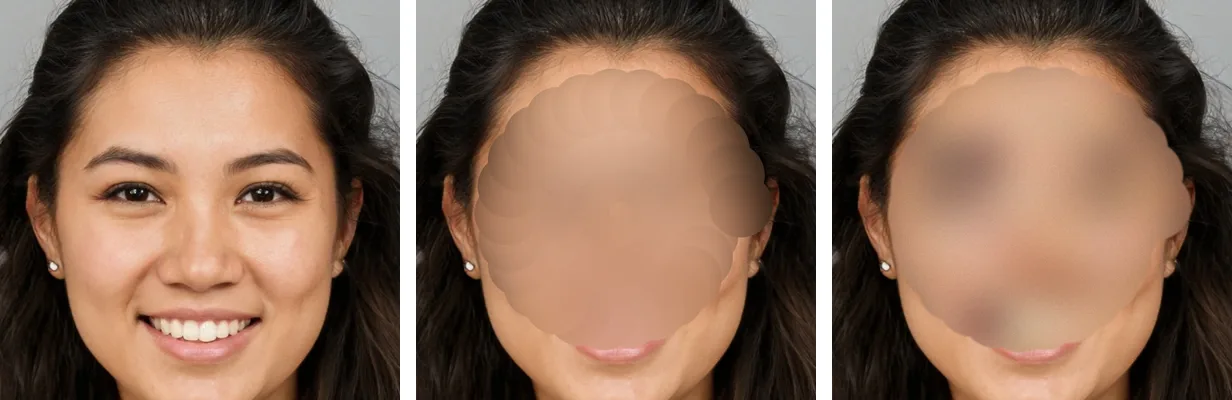
Why this cannot be run backwards: a face you paint over ends up at most about eight blocks across. Thousands of different faces reduce to exactly the same blocks, so there is no single answer to work back to, and the random noise and grid offset change on every stroke and are never saved. An AI model can paint a plausible face onto blocks like these, but it would be an invented face, not the real one.
Where the randomness comes from
The noise is only as good as the randomness behind it, so Shield blur mixes three independent sources for every stroke:
- Your hand. The tool records the exact time and position of every movement in your brush stroke. The tiny variations in how a person moves a mouse or a finger are physical noise. Encryption software has long used the same trick when it asks you to move your mouse.
- Cloudflare’s lava lamps. The tool fetches 32 random bytes from our server, which runs on Cloudflare. Cloudflare feeds its servers’ randomness with entropy that includes LavaRand, a wall of about 100 lava lamps in its San Francisco office filmed by a camera (Cloudflare). Only those random bytes come down. Your photo never goes up.
- Your browser. Its built-in secure random number generator, which draws on your device’s own entropy.
The three are blended through SHA-256 into one key, and that key drives AES in counter mode to produce the random stream, the construction NIST describes as CTR_DRBG (SP 800-90A). Every random choice in the stroke comes from that stream: the grid offset, the colour noise and the grain. If one source were weak or unavailable, the other two would still decide the result. The tool shows under the image which sources fed your last stroke.
What changed from v1 to v4
| Version | What it does |
|---|---|
| Standard (still available) | The classic soft blur. Looks hidden, but it is a predictable smear. |
| Shield blur v1 | Broke the area into a square grid of colour blocks, shuffled them with the browser’s secure generator, then blurred and grained it. |
| Shield blur v2 | Replaced the grid with patches on a golden-angle spiral spun to a random angle, sized by the golden ratio, so the result looks organic instead of blocky. |
| Shield blur v3 | Mixed randomness from your hand, Cloudflare’s lava lamps and your browser through SHA-256 and an AES counter-mode stream. |
| Shield blur v4 to v4.2 (current) | Stopped shuffling, which scrambled the shape into a blotchy mess. It keeps the outline and throws away the detail instead: coarse blocks on a random grid, colours snapped to a coarse step with random noise, then softened. Same three randomness sources as v3. v4.1 makes the blocks scale with the area you paint, not only with the brush; v4.2 evens the blocks out so the eyes do not stay as dark spots. |
The version is written into the name of every file you save, for example blurred-shield-v4.2-….png, so you can always tell which method a picture went through.
Developers can read the full method and maths, and use the same code in their own apps, in our technical note: Shield Blur, FP-TN-01.
Common doubts
“Does my photo get uploaded anywhere?”
No. The whole tool runs in your browser. The only thing it fetches is the 32 random bytes from our server, and nothing about your image is sent with that request.
“Can people still tell it’s me?”
Shield blur removes the detail of the face under the brush and keeps only its outline. Hair, tattoos, clothes, the room and the caption can still give someone away, so paint over anything distinctive as well. Painting a wider area around the face makes bigger blocks and hides more.
“Is it free?”
Yes. No sign-up and no watermark. The standard blur is still there as a switch if you want the classic look.
“What about photos of me that are already online?”
A blur only protects the photos you are about to share. Face search engines have already indexed many public photos. That part is what FacePrivacy does: we file opt-out requests with the face search engines we support and re-file them as necessary.
Hide a face before you post it.
Drop in a photo, paint over the face, and save it. Free, in your browser, with Shield blur v4.2 on by default.
Blur a photo with Shield blur →Already online? Opt my face out of face search
Sources
- McPherson, Shokri, Shmatikov (2016): Defeating Image Obfuscation with Deep Learning
- Depix: recovers passwords from pixelized screenshots
- Cloudflare: Randomness 101, LavaRand in production
- NIST SP 800-90A Rev. 1: Recommendation for Random Number Generation Using Deterministic Random Bit Generators
- Vogel (1979): A better way to construct the sunflower head, Mathematical Biosciences